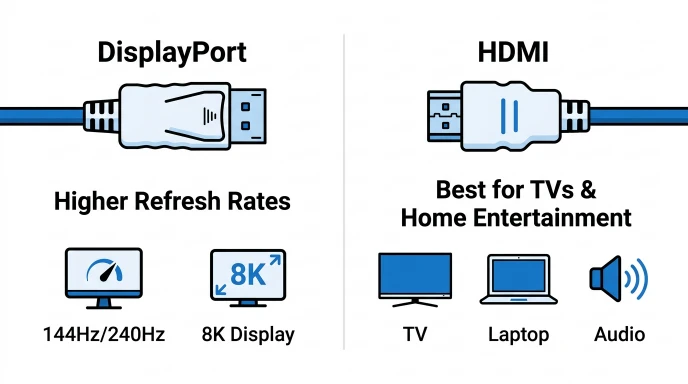
DisplayPort and HDMI both transmit high-quality audio and video, but DisplayPort is generally better for PC gaming and high refresh rates, while HDMI is the preferred choice for TVs and home entertainment.
If you’re buying a new monitor, TV, or graphics card, you’ve probably seen both DisplayPort and HDMI ports.
At first glance, they seem similar because both transmit video and audio, but they have different features and are designed for different uses.
Understanding the difference between DisplayPort and HDMI helps you choose the right cable for gaming, work, or home entertainment.
In simple words, DisplayPort is mainly designed for computer monitors and high-performance displays, while HDMI is commonly used for TVs, gaming consoles, streaming devices, and home theaters.
In this guide, you’ll learn the difference between DisplayPort and HDMI through simple definitions, comparison tables, real-world examples, and expert insights.
Difference Between DisplayPort and HDMI
DisplayPort is best for PCs, high refresh rates, and multiple monitors.
HDMI is best for TVs, gaming consoles, streaming devices, and home entertainment.
Example: A gamer using a high-refresh-rate monitor may choose DisplayPort, while someone connecting a PlayStation to a TV usually uses HDMI.
What Is DisplayPort and HDMI?
DisplayPort
DisplayPort is a digital display interface mainly designed for computers and monitors. It supports high resolutions, high refresh rates, and advanced display features.
Example: Connecting a gaming PC to a 240 Hz monitor.
HDMI
HDMI (High-Definition Multimedia Interface) is a digital interface used to transmit both video and audio between devices such as TVs, laptops, gaming consoles, and projectors.
Example: Connecting a Blu-ray player to a television.
Pronunciation
| Term | US Pronunciation | UK Pronunciation |
| DisplayPort | /dɪˈspleɪ pɔːrt/ | /dɪˈspleɪ pɔːt/ |
| HDMI | /ˌeɪtʃ.diː.emˈaɪ/ | /ˌeɪtʃ.diː.emˈaɪ/ |
Now that you know the basics, let’s explore the difference between DisplayPort and HDMI in detail.
Difference Between DisplayPort and HDMI Comparison
| Feature | DisplayPort | HDMI |
| Main Use | Computer monitors | TVs and entertainment devices |
| Audio Support | Yes | Yes |
| Video Support | Yes | Yes |
| High Refresh Rates | Excellent | Very good |
| Multiple Monitors | Supports daisy chaining (supported versions) | Usually requires separate connections |
| Common Devices | PCs, workstations, gaming monitors | TVs, gaming consoles, projectors |
| Connector Lock | Often includes a locking latch | No locking latch |
| Popular For | Gaming and professional work | Home entertainment |
Key Differences Explained Between DisplayPort and HDMI
1. Primary Purpose
The biggest difference is where each connection is commonly used.
DisplayPort was designed mainly for computers and professional displays.
HDMI was designed for consumer electronics and home entertainment.
Example:
- Gaming monitor → DisplayPort
- Smart TV → HDMI
2. High Refresh Rate Performance
DisplayPort is often preferred by PC gamers because it supports high refresh rates at higher resolutions.
HDMI also supports high refresh rates, especially newer HDMI versions, but many gaming monitors still favor DisplayPort for PC connections.
Example:
A competitive gamer using a 240 Hz monitor usually connects it through DisplayPort.
3. Multiple Monitor Support
One major advantage of DisplayPort is support for connecting multiple compatible monitors from a single output through daisy chaining.
HDMI typically connects one display per port.
This makes DisplayPort popular in offices and professional workstations.
4. Device Compatibility
HDMI is supported by almost every modern TV and entertainment device.
DisplayPort is most common on desktop PCs, graphics cards, and computer monitors.
Examples:
HDMI devices:
- Smart TVs
- Game consoles
- Streaming devices
- Soundbars
- Blu-ray players
DisplayPort devices:
- Desktop PCs
- Gaming monitors
- Professional monitors
- Workstations
5. Connector Design
DisplayPort connectors often include a locking mechanism that prevents accidental disconnection.
HDMI connectors plug in securely but do not usually include a locking latch.
This can be useful in office setups where cables are moved frequently.
6. Audio and Video Support
Both DisplayPort and HDMI carry digital video and audio through a single cable.
Both support:
- High-definition video
- Multi-channel audio
- Modern display technologies
For most everyday users, either connection delivers excellent picture quality when used with compatible devices.
7. Common Applications
Different users choose different cables depending on their needs.
Choose DisplayPort for:
- PC gaming
- Multiple monitors
- Professional graphics work
- High-refresh-rate displays
Choose HDMI for:
- Home theater systems
- TVs
- Streaming devices
- Gaming consoles
- Projectors
Why Does the Difference Between DisplayPort and HDMI Matter?
Choosing the correct connection helps you get the best performance from your equipment.
For example:
- Gamers often benefit from DisplayPort’s support for high refresh rates on compatible hardware.
- Movie lovers usually choose HDMI because it is widely supported by TVs and media devices.
- Office users with multiple monitors often prefer DisplayPort for its daisy-chaining capability.
Understanding these differences ensures you buy the right cable and avoid compatibility issues.
Can DisplayPort and HDMI Deliver the Same Picture Quality?
In many everyday situations, yes.
If both devices support the same resolution and refresh rate, image quality can be nearly identical.
The biggest differences are usually found in:
- Maximum supported resolution
- Maximum refresh rate
- Multi-monitor support
- Device compatibility
- Advanced display features
For casual users watching movies or browsing the web, either connection often provides an excellent viewing experience.
Which Is Better for Gaming?
The answer depends on your setup.
DisplayPort is often better for:
- Gaming PCs
- High refresh rates
- Competitive gaming
- Multiple monitors
HDMI is often better for:
- PlayStation
- Xbox
- Smart TVs
- Living room gaming
- Home entertainment
Modern graphics cards frequently include both ports, allowing users to choose the connection that best fits their display.
Are DisplayPort and HDMI Compatible?
Yes, but not always directly.
With the correct adapter or compatible cable, many devices can connect between DisplayPort and HDMI. However, some features or maximum resolutions may depend on the devices, cable type, and adapter being used.
Before purchasing an adapter, always check the specifications of both your source device and your display to ensure compatibility.
Difference + Similarity Between DisplayPort and HDMI
| Feature | DisplayPort | HDMI | Similarity |
| Main Purpose | Designed mainly for PC displays | Designed mainly for TVs and home entertainment | Both transmit digital video and audio. |
| Common Devices | PCs, gaming monitors, workstations | TVs, game consoles, projectors | Both connect display devices. |
| Audio Support | Yes | Yes | Both carry audio and video through one cable. |
| Video Quality | Excellent | Excellent | Both support high-definition and high-resolution video. |
| Multiple Displays | Supports daisy chaining on compatible devices | Typically one display per port | Both can connect external displays. |
| Connector Design | Often has a locking latch | Standard plug without a latch | Both use dedicated display connectors. |
| Best For | Gaming, productivity, professional work | Home theater, TVs, streaming, consoles | Both are widely used display standards. |
This table clearly shows the difference and similarity between DisplayPort and HDMI for quick understanding.
Common Mistakes with DisplayPort and HDMI
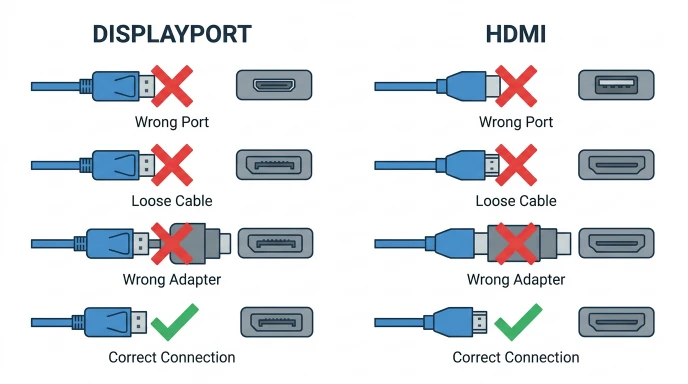
Many people assume these two connections are identical. Here are some common mistakes and how to avoid them.
1. Thinking DisplayPort and HDMI Are the Same
Both transfer digital audio and video, but they are designed for different types of devices.
Correction: Choose the connection based on your device and usage.
2. Buying the Wrong Cable
Some users purchase an HDMI cable when their monitor only supports DisplayPort.
Correction: Always check the available ports before buying a cable.
3. Assuming Every Version Supports the Same Features
Different versions of DisplayPort and HDMI support different resolutions, refresh rates, and features.
Correction: Verify the specifications of both your cable and your devices.
4. Ignoring Adapter Limitations
Not every DisplayPort-to-HDMI adapter supports all resolutions or refresh rates.
Correction: Buy an adapter that matches your display requirements.
5. Choosing HDMI for Every Gaming Setup
Many PC gamers automatically use HDMI because it is familiar.
Correction: DisplayPort is often the better option for high-refresh-rate PC monitors.
Real-Life Examples with DisplayPort and HDMI
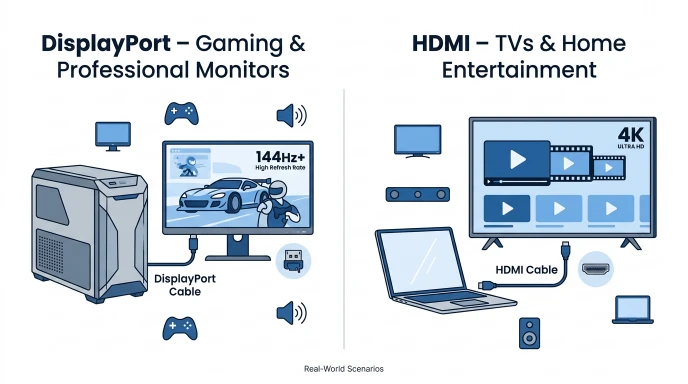
Example 1: PC Gaming
A gamer connects a gaming PC to a 240 Hz monitor using DisplayPort for smooth gameplay.
Example 2: Home Theater
A family connects a streaming device to a Smart TV using HDMI.
Example 3: Office Workstation
An office employee connects multiple compatible monitors through DisplayPort daisy chaining to create a larger workspace.
Example 4: Classroom Presentation
A teacher connects a laptop to a projector using HDMI because it is supported by most presentation equipment.
Example 5: Video Editing Studio
A video editor uses DisplayPort to connect a high-resolution professional monitor for detailed color work.
When to Use Each
Use DisplayPort When You Need:
- High-refresh-rate gaming
- Multiple monitor setups
- Professional graphics work
- Desktop PC connections
- High-performance displays
Use HDMI When You Need:
- Smart TVs
- Gaming consoles
- Projectors
- Home theater systems
- Streaming devices
- Everyday laptop-to-TV connections
Quick Tip: If you’re connecting a PC monitor, DisplayPort is often the better choice. If you’re connecting a TV or console, HDMI is usually the most convenient option.
Why People Get Confused About DisplayPort and HDMI
These display standards are easy to confuse because they perform many of the same tasks.
Common reasons include:
- Both transmit digital video and audio.
- Both connect monitors and displays.
- Both support high resolutions.
- Many graphics cards include both ports.
- Different device manufacturers recommend different standards.
The easiest way to remember the difference is:
- DisplayPort is primarily focused on computer displays and productivity.
- HDMI is primarily focused on TVs and home entertainment.
How Search Engines Understand “Difference Between DisplayPort and HDMI” and User Intent
When someone searches “difference between DisplayPort and HDMI,” search engines like Google recognize that the user is comparing two display interfaces before purchasing or connecting a device.
Google aims to show content that answers questions such as:
- Which is better for gaming?
- Which supports higher refresh rates?
- Can DisplayPort connect to HDMI?
- Which cable should I buy?
- Do they provide the same picture quality?
Helpful content that includes comparison tables, compatibility tips, real-world examples, and buying advice is more likely to satisfy user intent. Related terms such as refresh rate, resolution, graphics card, monitor, gaming PC, 4K, 8K, and digital audio also help search engines understand the topic more completely.
Expert Insight
For most users, both DisplayPort and HDMI provide excellent image and sound quality when paired with compatible devices. The better choice depends on how you plan to use your equipment.
If you’re building a gaming PC or using high-refresh-rate monitors, DisplayPort is often the preferred option because of its strong support for modern PC displays and multi-monitor setups.
If you’re connecting a television, streaming device, or game console, HDMI remains the most widely supported and convenient standard. Checking your device’s specifications before buying a cable can save time and prevent compatibility issues.
FAQs
1. What is the main difference between DisplayPort and HDMI?
DisplayPort is mainly designed for computer monitors, while HDMI is mainly designed for TVs and home entertainment devices.
2. Which is better for gaming?
For PC gaming, DisplayPort is often preferred, especially for high-refresh-rate monitors. HDMI is an excellent choice for gaming consoles and TVs.
3. Can DisplayPort carry audio?
Yes. DisplayPort supports both digital video and audio through a single cable.
4. Does HDMI support high refresh rates?
Yes. Modern HDMI versions support high resolutions and high refresh rates on compatible devices.
5. Can I connect DisplayPort to HDMI?
Yes. You can connect them using a compatible adapter or cable, though supported features may vary depending on the hardware.
6. Which is better for multiple monitors?
DisplayPort is generally better because compatible versions support daisy chaining, allowing multiple monitors from one connection.
7. Is picture quality better with DisplayPort?
Not necessarily. If both devices support the same resolution and refresh rate, picture quality is usually very similar.
8. Which cable should I buy?
Choose the cable that matches your device’s ports and intended use. DisplayPort is ideal for many PC setups, while HDMI is the standard choice for most TVs and home entertainment systems.
Conclusion
Understanding the difference between DisplayPort and HDMI helps you choose the right connection for your devices. Although both standards transmit high-quality digital video and audio, they are designed with different priorities. DisplayPort is commonly preferred for PC gaming, professional workstations, and multi-monitor setups, while HDMI is the standard connection for televisions, gaming consoles, projectors, and home entertainment systems.
For most everyday users, either option delivers excellent performance when used with compatible hardware. The best choice depends on your monitor or TV, the devices you’re connecting, and the features you need. By matching the right cable to your setup, you can enjoy reliable performance, sharp visuals, and a better overall viewing experience.
Read more about!
Difference Between Velocity and Acceleration: Complete Guide
Difference Between Lose and Loose: Easy Guide

I am James Carter, a professional content writer from the United States. I specialize in writing simple and clear comparison blogs that help students and readers understand difficult topics easily. My writing focuses on everyday language, education, science, and lifestyle topics. I believe that learning should be easy for everyone, so I use simple words and real-life examples in my articles.