UI (User Interface) focuses on how a product looks and feels, while UX (User Experience) focuses on how easy, useful, and enjoyable it is to use.
When people start learning web design or app development, one of the most confusing topics is the difference between UI and UX.
Many users search for the difference between UI and UX because both terms are often used together, especially in tech companies like Google, Meta, and product design teams on platforms like Instagram and YouTube.
In simple terms, the difference between UI and UX is that UI (User Interface) focuses on how a product looks, while UX (User Experience) focuses on how a product works and feels for the user. This confusion is very common because both UI and UX are closely connected but serve different purposes.
In this guide, we will clearly break down UI vs UX, explain real-world examples, show key differences, discuss why they matter, and help you finally understand the difference between UI and UX in a practical way that designers actually use in real projects.
Difference Between UI and UX
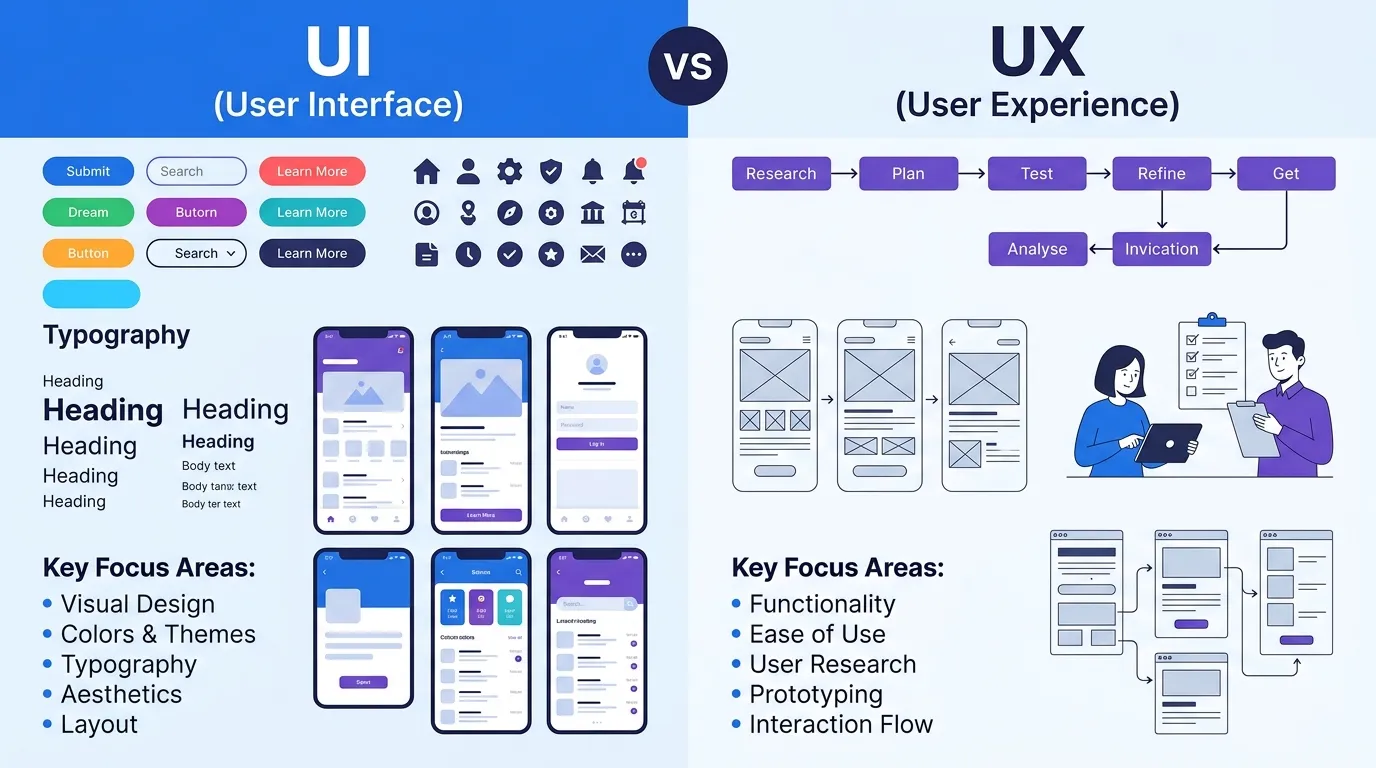
UI is about the visual design and interactive elements of a product, while UX is about the overall user journey and experience.
Example:
A beautifully designed app (UI) may still feel frustrating to use if buttons are confusing (UX problem).
Definition of Difference Between UI and UX
- UI (User Interface): The visual elements users interact with, such as buttons, colors, typography, and layout.
- UX (User Experience): The overall experience a user has while using a product, including ease of use, flow, and satisfaction.
Pronunciation
- UI: “Yoo-Eye”
- UX: “Yoo-Ex”
Now that we understand the basics, let’s go deeper into how UI and UX actually work in real digital products.
Comparison: Difference Between UI and UX
| Feature | UI (User Interface) | UX (User Experience) | Similarity |
| Focus | Visual design elements | User journey & experience | Both improve product usability |
| Purpose | Make product attractive | Make product useful | Both aim for better user satisfaction |
| Tools | Figma, Adobe XD | User research, wireframes | Both use design tools |
| Output | Screens, buttons, icons | Flow, structure, logic | Both affect final product |
| User Role | What user sees | What user feels | Both impact perception |
| Testing | Visual testing | Usability testing | Both require user feedback |
| Industry Use | App & web design | Product development | Both used in tech companies |
This table clearly shows the difference and similarity between UI and UX for quick understanding.
Key Differences Between UI and UX
1. UI is Visual, UX is Functional
UI focuses on colors, buttons, and layout, while UX focuses on how users move through the app.
Example: A login page may look beautiful (UI), but if login steps are confusing, UX is poor.
2. UI is “Look”, UX is “Feel”
UI is what users see, UX is what users experience emotionally.
Example: Apple products are known for strong UX because they feel simple to use.
3. UI Designers Design Screens, UX Designers Design Flow
UI designers create screens, UX designers decide how users move between them.
4. UI is Static, UX is Dynamic
UI is about design elements, UX changes based on user behavior and feedback.
5. UI is Surface Level, UX is Deep Structure
UI is the surface of a product, UX is the backbone of how it works.
6. UI Attracts Users, UX Retains Users
Good UI brings users in, good UX keeps them using the product.
7. UI Uses Design Tools, UX Uses Research Tools
UI uses tools like Figma, UX uses surveys, analytics, and user testing.
What is UI (User Interface)?
UI stands for User Interface. It includes everything users see on a screen like:
- Buttons
- Icons
- Colors
- Typography
- Layout
UI is mainly responsible for visual appeal and brand identity. Companies like Meta and Instagram invest heavily in UI to make apps visually engaging.
What is UX (User Experience)?
UX stands for User Experience. It includes:
- User journey
- Navigation flow
- Ease of use
- Emotional satisfaction
UX ensures that users can complete tasks without confusion or frustration. Platforms like Google Search are simple because they focus heavily on UX design.
Why UI and UX Exist Together
UI and UX are not separate in real product development. They work together like:
- UI = Car design (look & interior)
- UX = Driving experience (smoothness, comfort)
Without UX, UI becomes useless. Without UI, UX feels incomplete.
How UI and UX Work in Real Apps
Example: Instagram
- UI: Buttons, stories, reels layout
- UX: Easy scrolling, engagement flow, content discovery
Example: YouTube
- UI: Video player, thumbnails
- UX: Recommendations, autoplay, watch history system
Common Mistakes with UI and UX
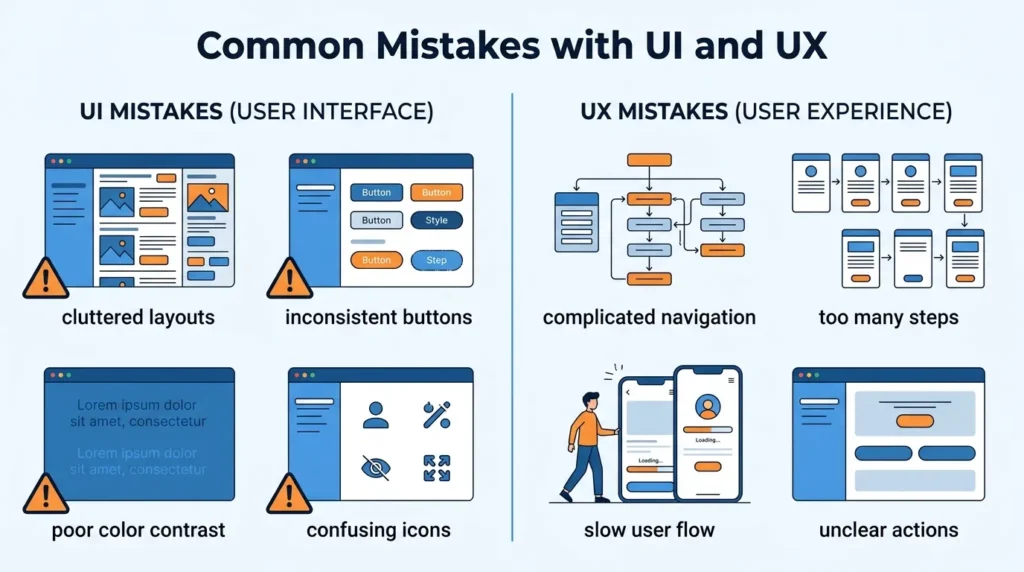
1. Thinking UI is more important than UX
Fix: UX is actually more important for user retention.
2. Ignoring user feedback
Fix: Always test with real users.
3. Overloading UI with designs
Fix: Keep interface simple and clean.
4. Confusing design tools with UX thinking
Fix: UX is research-based, not just software-based.
5. Not aligning UI with UX flow
Fix: Design must support user journey.
Real-Life Examples with UI and UX
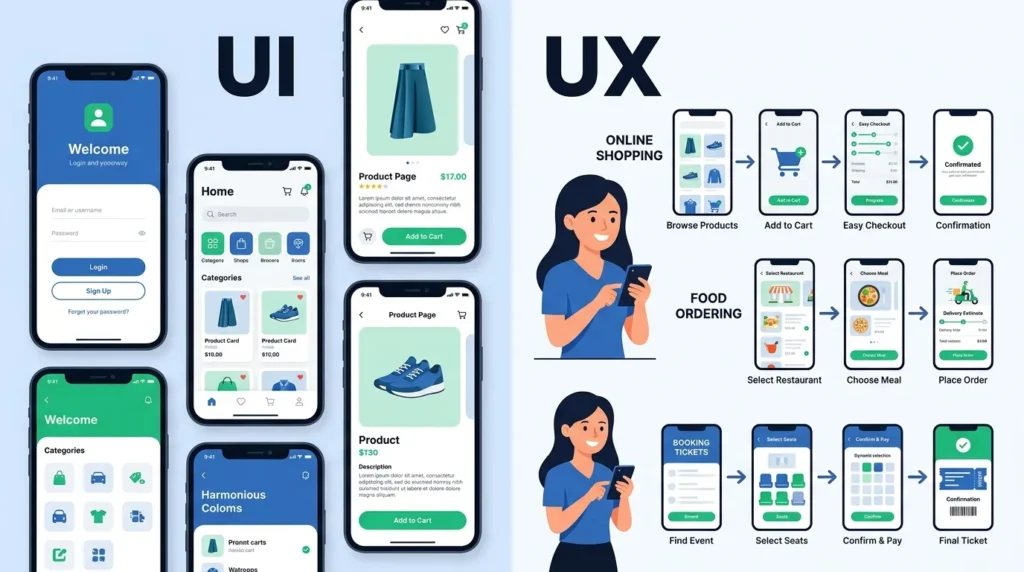
1. E-commerce Website
UI: Product images, buttons, layout
UX: Easy checkout process, fast loading
2. Banking App
UI: Dashboard design, icons
UX: Security, smooth transactions
3. Food Delivery App
UI: Menu visuals, ratings
UX: Fast ordering and tracking
4. Social Media App
UI: Feed design
UX: Engagement and scrolling experience
When to Use UI vs UX
- Use UI when focusing on visuals and branding
- Use UX when improving usability and customer satisfaction
In real projects, both are needed together for success.
Why People Get Confused Between UI and UX
- Both terms are often used together
- Job roles overlap in startups
- Social media simplifies explanations
- Beginners assume both mean “design”
How Search Engines Understand UI and UX
Search engines like Google analyze user intent when someone searches “difference between UI and UX.”
They look for:
- Comparison content
- Clear definitions
- Examples and tables
- Beginner-friendly explanations
Platforms like YouTube and Instagram also recommend UI/UX content based on engagement signals like watch time and interaction.
Expert Insight
In real product design environments, UI and UX are treated as two layers of the same system. Experienced designers first focus on UX structure before applying UI visuals.
From industry experience, companies like Google prioritize UX first because usability directly affects user retention, while UI supports brand identity and emotional appeal.
A certified UI/UX designer always begins with user research, not visuals. That is the biggest difference beginners often miss.
FAQs
Is UI easier than UX?
UI may look easier, but both require different skill sets.
Can UI exist without UX?
Technically yes, but it would not be functional.
Which is more important, UI or UX?
UX is more important for usability, UI is important for attraction.
Do UI and UX designers work together?
Yes, they collaborate closely in product teams.
Is coding required for UI/UX?
Not always, but basic understanding helps.
What tools are used in UI/UX?
Figma, Adobe XD, Sketch, and research tools.
Can one person do both UI and UX?
Yes, many designers are hybrid UI/UX professionals.
Conclusion
The difference between UI and UX is simple but very important in digital design. UI focuses on how a product looks, while UX focuses on how it works and feels. Both are essential for creating successful apps and websites used by platforms like Google, YouTube, and Instagram.
UI attracts users with visual design, but UX keeps them engaged through smooth interaction and usability. In real-world practice, UI and UX always work together, and separating them completely is not practical.
Understanding the difference between UI and UX helps beginners, designers, and developers build better digital products that are not only beautiful but also easy and enjoyable to use.
Read more about!
Difference Between OCD and OCPD: Complete Guide
Difference Between Icing and Frosting: Complete Guide

I am James Carter, a professional content writer from the United States. I specialize in writing simple and clear comparison blogs that help students and readers understand difficult topics easily. My writing focuses on everyday language, education, science, and lifestyle topics. I believe that learning should be easy for everyone, so I use simple words and real-life examples in my articles.